


Compress Image to 100KB
Reduce and compress image file size to exactly 100KB or below for online forms and portals
Get an image under 100KB without a software install
100% Client-Side PrivacyA limit of 100KB is common on job application sites, government and school portals, and e-commerce uploads. This page sets the target to 100KB for you, so you can upload an image and download a version that is small enough to be accepted.
At 100KB there is room to keep a decent amount of detail, which makes it a good size for profile photos, ID scans and signed documents saved as images. You can switch the output format, scale the dimensions or fine-tune quality yourself, and compress many files together.
Everything is processed inside your browser, so personal documents never leave your device.
When 100KB is the right size
- Profile and ID photos on application portals
- Scanned certificates and signed pages saved as images
- Product images for small online shops
- Attachments that need to stay light in email
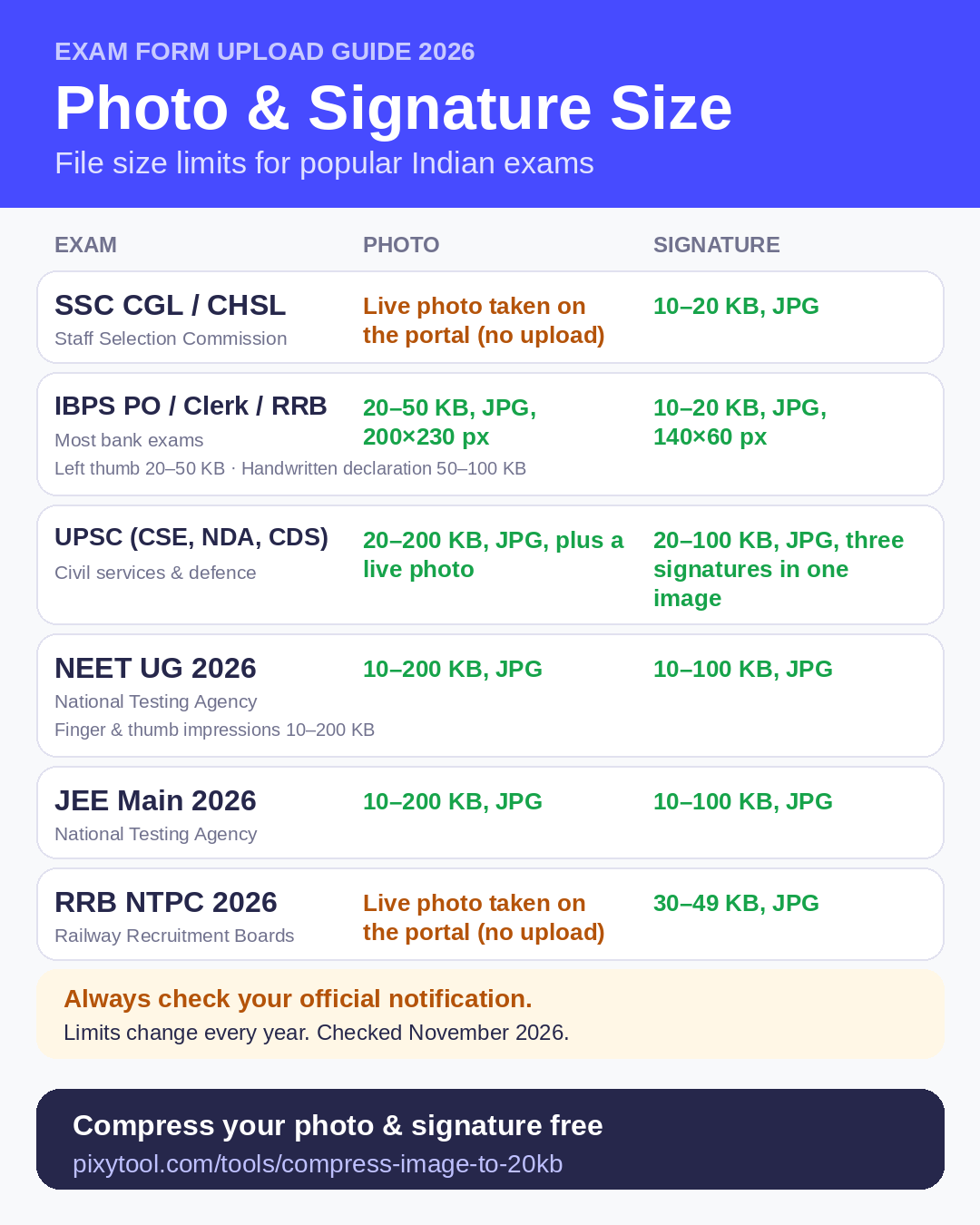
Photo & signature size for exam forms (2026)
File size limits for popular Indian exam applications, checked November 2026. Limits can change with every notification, so always confirm in your official notice before uploading.
| Exam | Photo | Signature | Other uploads |
|---|---|---|---|
| SSC CGL / CHSL | Live photo taken on the portal (no upload) | 10–20 KB, JPG | — |
| IBPS PO / Clerk / RRB | 20–50 KB, JPG, 200×230 px | 10–20 KB, JPG, 140×60 px | Left thumb 20–50 KB · Handwritten declaration 50–100 KB |
| UPSC (CSE, NDA, CDS) | 20–200 KB, JPG, plus a live photo | 20–100 KB, JPG, three signatures in one image | — |
| NEET UG 2026 | 10–200 KB, JPG | 10–100 KB, JPG | Finger & thumb impressions 10–200 KB |
| JEE Main 2026 | 10–200 KB, JPG | 10–100 KB, JPG | — |
| RRB NTPC 2026 | Live photo taken on the portal (no upload) | 30–49 KB, JPG | — |
How to use Compress Image to 100KB online for free
- 1Provide your input: Select, upload, or paste your file or text into the interactive Compress Image to 100KB workspace above.
- 2Adjust parameters: Customize your preferred options, formatting rules, quality sliders, or conversion preferences.
- 3Inspect instant preview: Review the high-fidelity output rendered immediately in your browser with zero latency.
- 4Save or copy: Click download to save your processed file or copy the generated text to your clipboard.
Frequently Asked Questions about Compress Image to 100KB
Q:How do I reduce an image to 100KB?
Add your image here. The target is set to 100KB, and the tool lowers quality and size automatically until it fits. Download the result.
Q:Does it keep the original file?
Yes. Your original stays untouched on your device and you download a new, smaller file.
Q:What if the result is a bit under 100KB?
The tool aims for the target and may land slightly below it. If your form needs an exact range, set a custom target size.
Q:Can I compress PNG screenshots to 100KB?
Yes, though PNG files are larger by nature. Converting to JPG or WebP usually reaches 100KB with less quality loss when the site allows it.
Q:Is it free?
Yes. It is free, has no sign-up and does not limit how many images you compress.
Similar Image Tools
Passport Photo Maker
Create official biometric passport and visa photos online with background color changer and 4x6 inch printable grid sheet for US, UK, Canada, Australia, Germany, and Schengen
Image Compressor
Compress JPEG, PNG, and WebP images to exact target file sizes in KB with minimal visible quality loss
Compress Image to 50KB
Compress photo, signature, or document images down to 50KB with optimal clarity
Compress Image to 20KB
Compress passport photos and signatures to under 20KB for government and job portal submissions